WebGL exposes the details of your graphics hardware (specifically, the string that describes the rendering engine) in 2 ways. There are three levels of protection that browsers have taken to protect this data.
gl.getParameter(gl.VENDOR)andgl.getParameter(gl.RENDERER)- these are the 'simple' names. At some point in the past, someone argued that it wasn't enough information, and therefore we have a second API-
let ext = gl.getExtension('WEBGL_debug_renderer_info');and thengl.getParameter(ext.UNMASKED_VENDOR_WEBGL)andgl.getParameter(ext.UNMASKED_RENDERER_WEBGL)
The unmasked values are intended to be the more detailed ones, so always make sure you're comparing apples to apples. Another axis is that WebGL can render with Hardware or Software. This isn't a guarentee which one you'll get, but you can hint towards one or the other and the browser may or may not respect it. Here are your values:
Alright, now let's talk about what browsers do about it. There's no point in talking about Vendor, Renderer, and Unmasked Vendor - they don't really show as much detailed info, it's all about Unmasked Renderer. There are three levels:
- Give a constant value. (Or don't return anything at all.)
- 'Round' the values into buckets
- Give the exact value back
Safari and Tor Browser give constant values.
Firefox 'rounds'.
Chrome (and Brave, and I assume all-ish other Chrome-based browsers) give the exact value.
Firefox actually is purusing constant values, this week. I wrote this document for our QA team to test it. (You can get a sense of the internal sausage making it takes to launch a privacy feature from it.) I don't know if you can see the dates but I made it May 20th. The problem is this - websites use this data legitimately to adjust behavior so that users get the best experience possible. I found one example where they detect a buggy graphics stack; and a couple of examples where they adjust rendering so things are more performant for users with lower end machines - a problem Apple has less to worry about because they only support certain machine models!
A common response to this seems to be ambivalence, and I would suggest that is a bit elitist. Yes, if you're caring about the details reveal by a particular Web API you probably have a computer where you don't need to worry, but making the web work well for everyone is important for equitable access to improving everyone's human condition.
We have been bucketing WebGL Renderer since 2021. While many of our (supported, on-by-default) fingerprinting protections are part of Enhanced Tracking Protection - rolling out first in PBM/ETP Strict before making it to ETP Standard/Normal Browsing Mode - the bucketing is on by default, for everyone, and is not disabled if ETP is disabled.
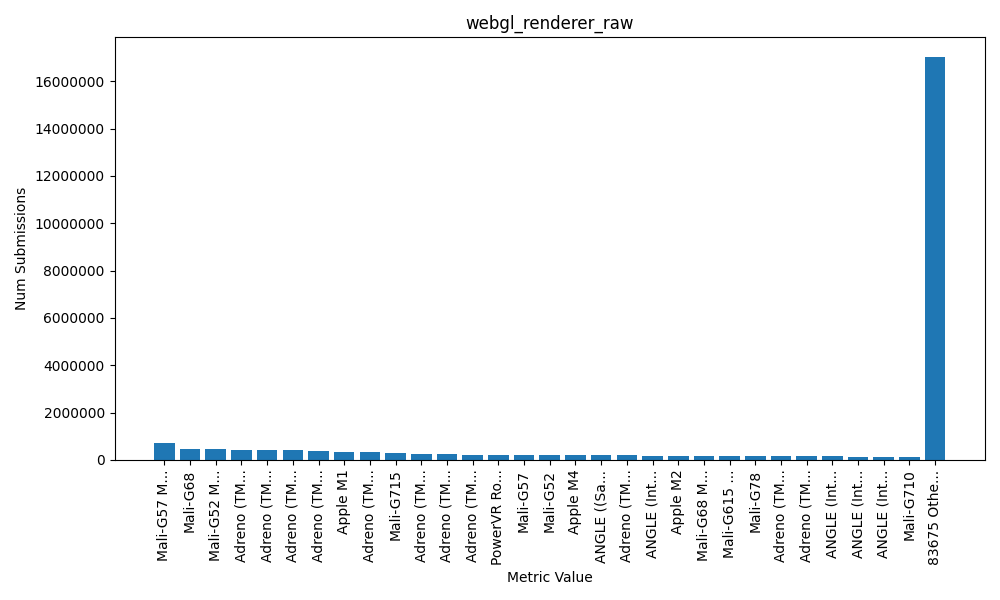
How much of a difference does it make? A lot! Here is the distribution of the raw values. 83,705 distinct values.
Compare that to the bucketed data. 131 distinct values.
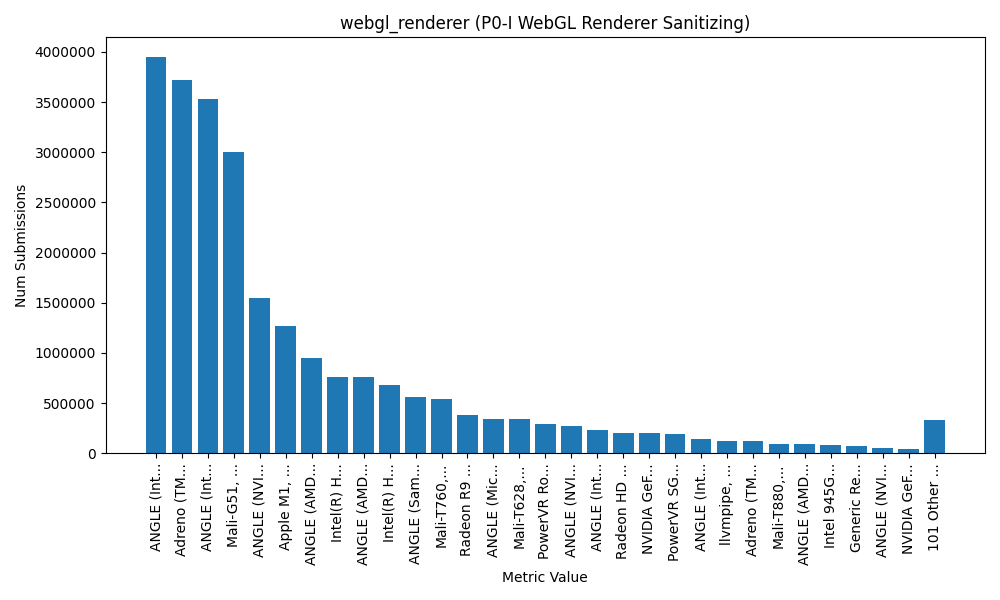
Now this data is from Firefox, so I cant say conclusively what the distribution of data is in other browsers, but... yeah. To claim Chrome (of all browsers!) is doing this better than us is pure FUD. We're making a big impact in how fingerprintable you are today and we're trying to improve it even further.
required, hidden, gravatared
required, markdown enabled (help)
* item 2
* item 3
are treated like code:
if 1 * 2 < 3:
    print "hello, world!"
are treated like code: